Copy eBay listings between accounts.
Your listings took work. Your next store shouldn’t. Bring your photos, descriptions, prices, and item specifics into drafts for another connected eBay account. Review, adjust, and publish when you’re ready.
One listing. Ten. A thousand. Five thousand. BinFlip helps you reuse the work you’ve already done, from a single item to a catalog migration in manageable batches.
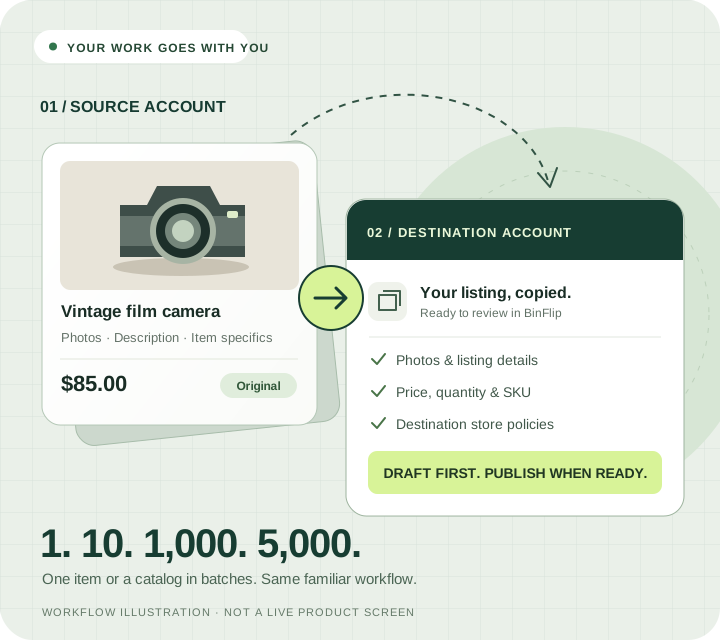
One listing or your next 5,000. You’re in the right place.
1 listing: One listing is a great place to start.
Choose a familiar item and see its photos, description, price, and specifics arrive in a draft for your other account. Check the destination policies and publish when ready.
10 listings: Give your new store a focused starting lineup.
Select a small group from one source account, choose the destination store, and review the drafts together. It’s a practical way to separate a niche or test your migration workflow.
1,000 listings: Keep the listing work. Change where it lives.
Move through your catalog in manageable batches. Group similar items, confirm the right policies, and review copy and publishing results before starting the next batch.
5,000 listings: A large catalog deserves a repeatable process.
Start with a representative test batch, then work through the rest in stages. Check the destination account’s selling limits and your total active listings across connected accounts as you go.
These are project sizes, not a promise to publish thousands of listings in one click. Larger copies run in batches; timing and publishing depend on listing details, eBay responses, and account limits.
Copy the work. Keep the control.
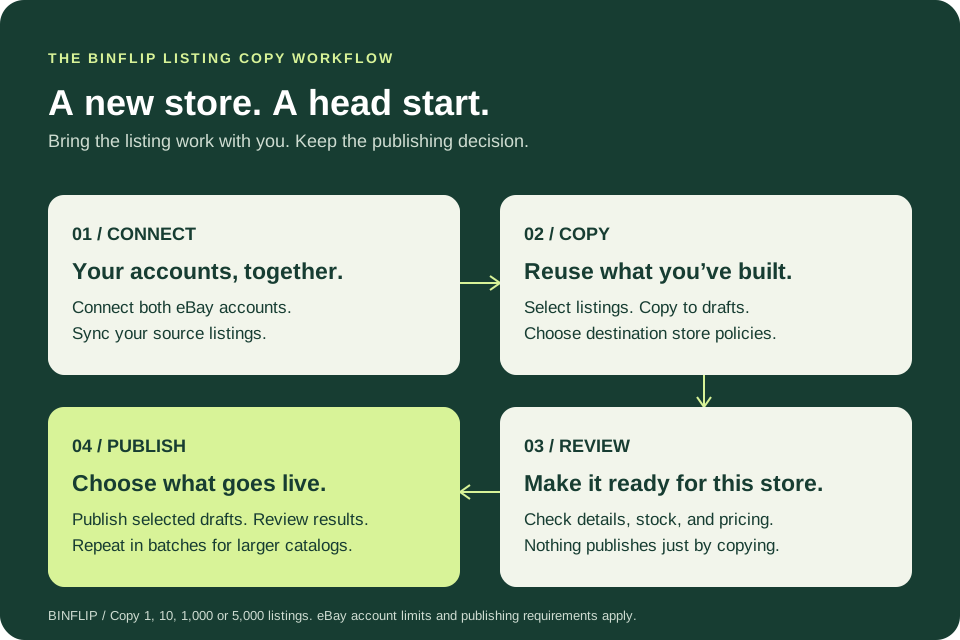
Connect both eBay accounts
Authorize the source and destination accounts in BinFlip. Sync the source listings and make sure the destination has shipping, payment, and return policies ready.
Select. Copy. Choose a store.
In eBay Listings, select listings from one source store and choose “Copy to drafts.” Choose another connected store, then confirm or change its policies.
Make the drafts yours
Check photos, descriptions, price, quantity, condition, and item specifics. Update anything that needs to change for the destination account before it goes live.
Publish on your terms
Select the prepared drafts and choose “List selected.” Decide whether eligible originals should end as part of the move, then review the result for each listing.
You already did the listing work.
Photos & descriptions
Carry over available listing images, titles, and descriptions instead of rebuilding each listing by hand.
The details buyers need
Reuse category, condition and condition notes, item specifics, and available product identifiers.
Price, quantity & SKU
Start with the source values and review them in the draft. BinFlip can generate a SKU when the source has none.
The right store policies
Select shipping, payment, and return policies belonging to the destination account. Save them as defaults for future work.
Built for the way your eBay business grows.
Open a specialist store
Give a niche its own storefront using the listing content you already prepared. Keep your collectibles, parts, or vintage inventory organized around the right audience.
Restructure an existing business
Shift selected inventory between accounts you manage. Review the move a batch at a time instead of facing an entire catalog of blank listing forms.
Keep running the business afterward
Stay in BinFlip for shared inventory, SKUs, storage locations, synced sales, cost tracking, and profit reports after the copying is done.
Your first copy starts with a free trial.
14 days of full app access. No credit card required. For ongoing bulk copying between stores, choose the $49.95 USD/month plan with up to 10,000 active eBay listings across connected accounts.
Compare all BinFlip plans. Talk to us about your catalog.
The complete seller’s guide
Read the complete guide to copying eBay listings between accounts.
BinFlip features for this eBay workflow
- Copy selected listings into editable drafts for another connected eBay account.
- Reuse available titles, descriptions, photos, prices, quantities, categories, condition details, item specifics, product identifiers, and SKUs.
- Choose shipping, payment, and return policies from the destination account before copying.
- Review drafts and publish selected listings, with an optional end-originals workflow for eligible store moves.
Workflow
- Connect your accounts
- Select listings and destination
- Review your copied drafts
- Publish with control
Product proof
- Editable drafts before publishing
- Destination store policies
- Per-listing results
- Shared inventory context
Frequently asked questions
Can I copy eBay listings from one account to another?
Yes. Connect both accounts to BinFlip, sync the source listings, select the listings you want, and choose Copy to drafts. Pick the destination account and its policies. BinFlip creates editable drafts that you can review before publishing as new eBay listings.
Can I copy just one listing, or 1,000 to 5,000 listings?
BinFlip is useful for 1, 10, 1,000, or 5,000 listings. Start with one or a small test batch, then repeat the workflow in manageable batches for a larger catalog. These are project sizes, not a guaranteed single-operation limit or completion time. eBay selling limits and publishing requirements still apply.
What does BinFlip copy from an eBay listing?
The copy workflow carries over available titles, descriptions, images, category, condition and condition description, item specifics, product identifiers, price, quantity, and SKU. The destination account uses the shipping, payment, and return policies you select. Review each draft for missing or outdated details before publishing.
Does copying immediately publish or end my original listings?
No. Copying creates drafts. When publishing, you can choose to end eligible originals first if you are moving inventory between stores. Ending happens before the new listing is created, so a publishing failure can leave the original ended. Review the results and resolve any failures before continuing. BinFlip does not end active auctions in this workflow.
Will my eBay item IDs, watchers, sales history, or feedback transfer?
No. Publishing a copied draft creates a new listing. The original eBay item ID, watchers, and listing sales history do not transfer to it, and account feedback stays with its account. BinFlip keeps the inventory context connected; it does not move an eBay account’s reputation.
Which plan includes bulk copying between eBay accounts?
Try the workflow during BinFlip’s free 14-day trial, with no credit card required. For ongoing bulk copying between stores, choose the $49.95/month plan with up to 10,000 active eBay listings across your connected accounts. BinFlip also has $19.95/month and $29.95/month plans for smaller active listing volumes; the high-volume plan is the one promoted for bulk cross-account copying.
Can I keep identical listings live on both accounts?
Copying is a preparation workflow, not permission to publish duplicate listings. eBay’s duplicate listings policy applies across accounts. Decide where your inventory will be offered, check available stock, and follow eBay’s rules before publishing. Creating a draft does not reserve stock or guarantee protection against overselling.
Does this transfer auctions or complete variation listings?
The publishing workflow creates fixed-price listings. Do not treat it as an auction transfer or a complete variation-group migration. For auctions, multi-variation listings, or other complex listings, contact [email protected] with your workflow before planning a large move.
Can I get help with a large catalog?
Yes. Email [email protected] with your approximate listing count, the types of listings you sell, and the accounts you want to work between. Start your trial with a representative batch so you can confirm the workflow using your own inventory.
Related eBay workflows
- Manage Multiple eBay Stores with Shared Inventory | BinFlip
- eBay Listing Drafts for Sellers | BinFlip
- eBay Profit Tracker for True Per-Item Profit | BinFlip
Start a free BinFlip trial or see BinFlip features for eBay resellers.